When choosing between Amazon Elastic Container Service (ECS) and Amazon Elastic Kubernetes Service (EKS), the question is not simply which service has more features. A more useful question is: Do you need your container platform to be cloud-agnostic, or do you want the easiest way to run containers on AWS?
If you are happy to stay on AWS, ECS is often the sensible starting point. It is relatively simple, integrates tightly with other AWS services, and offers an approachable console for everyday operations. EKS is valuable when you want to standardise on Kubernetes, reuse Kubernetes tooling, or keep open the possibility of running workloads across cloud providers or on premises. That flexibility introduces another layer to learn and maintain.
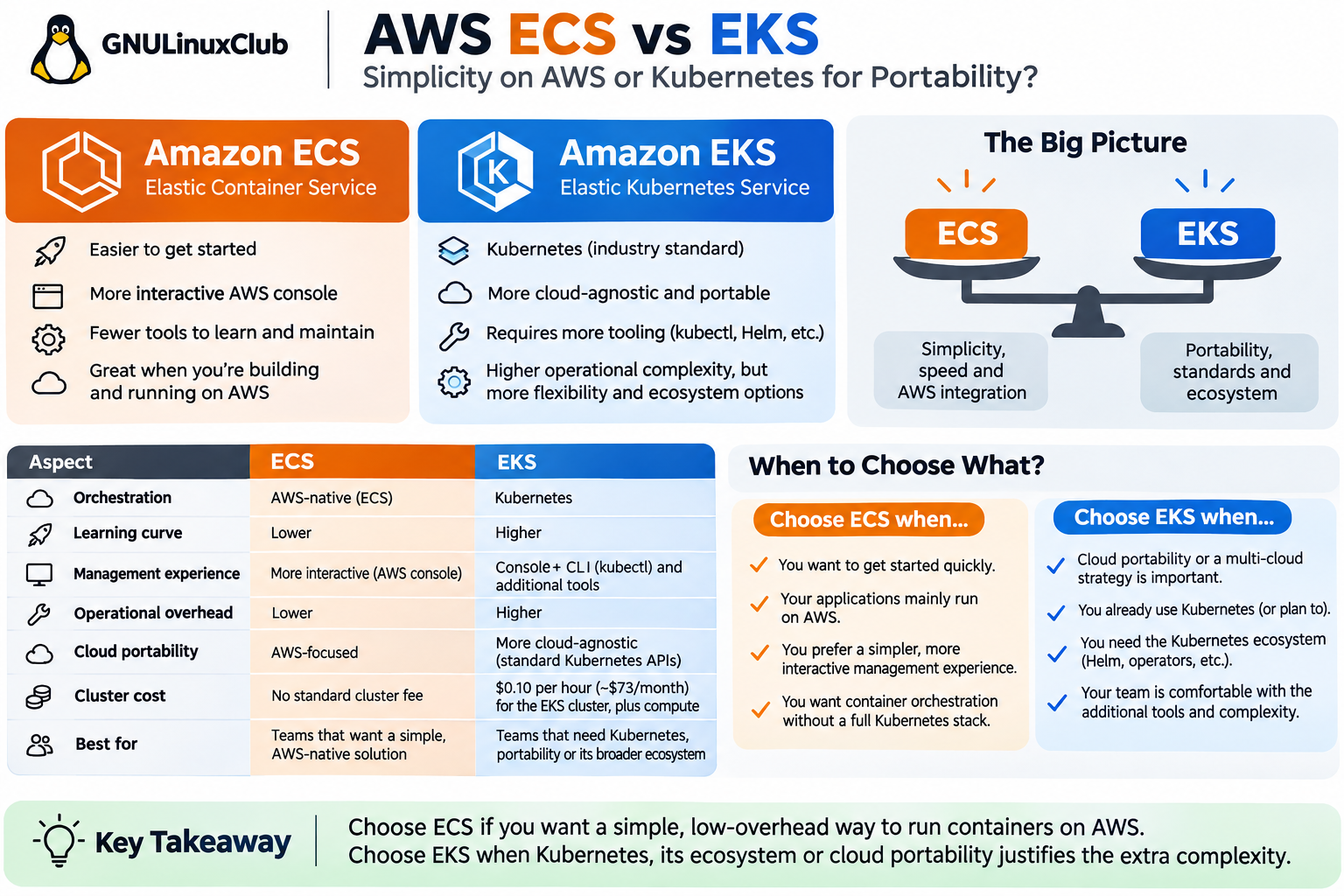
Quick answer: ECS or EKS?
- Choose ECS if your workloads primarily run on AWS, your team is small, and you value simplicity, quick deployments and straightforward console-based management.
- Choose EKS if you already operate Kubernetes, need Helm or Kubernetes operators, or have a meaningful multi-cloud or on-premises Kubernetes strategy.
- Do not choose EKS solely because Kubernetes is popular. First identify the concrete capability you need that ECS does not provide.
What are ECS and EKS?
Both services orchestrate containers: they help you deploy, run, scale and replace containerised applications. Both can use AWS infrastructure, integrate with AWS networking and security, and run workloads using supported compute options such as EC2 or AWS Fargate.
ECS is AWS’s native container orchestrator. You define a task definition (container image, CPU, memory, ports, environment variables and other settings), run tasks and typically use an ECS service to maintain the desired number of running tasks.
EKS provides a managed Kubernetes control plane. You use Kubernetes objects such as Deployments, Pods, Services and ConfigMaps, usually managing them with kubectl, Helm or GitOps tools. AWS manages the control plane, but your team still needs to understand Kubernetes operations.
The biggest difference: cloud portability
For many teams, the strongest reason to choose EKS is Kubernetes standardisation. Kubernetes exposes APIs that are also used by managed Kubernetes offerings on other clouds and by on-premises distributions. A Kubernetes Deployment manifest can often be adapted and reused across environments, whereas an ECS task definition and service are AWS-specific.
However, EKS does not automatically make an application cloud-agnostic. If your workload depends on AWS Application Load Balancers, IAM roles, EBS volumes, Route 53 or AWS-specific controllers, moving the Kubernetes workloads elsewhere will still involve engineering work. Kubernetes improves portability of the orchestration layer; the application’s dependencies determine how portable the complete system really is.
There is also a distinction between being able to migrate one day and having a genuine requirement to operate across providers. If a move is unlikely, the additional Kubernetes investment may not pay off.
Why ECS is easier to start with
One practical advantage of ECS is the AWS console. You can open a cluster, inspect services, check running and stopped tasks, review deployment events and follow configured CloudWatch logs without having to establish a separate Kubernetes administration workflow. This makes ECS approachable for developers and systems administrators who know AWS but are new to orchestration.
ECS is not entirely point-and-click: production deployments still benefit from infrastructure as code, CI/CD, least-privilege IAM policies and monitoring. But its core model—clusters, services, tasks and task definitions—is generally easier to learn than the corresponding Kubernetes ecosystem.
Why EKS involves more tooling
With EKS, the AWS console helps you inspect cluster resources and infrastructure, but day-to-day administration commonly involves kubectl and additional tools. Teams often use Helm for packaging, GitOps tooling for deployment, and Kubernetes-specific logging, metrics, ingress and policy integrations.
In particular, Kubernetes troubleshooting requires familiarity with Pods, events, namespaces, Services, scheduling, probes, networking and permissions. EKS Auto Mode can automate substantial parts of node and infrastructure management, but it does not remove the need to learn Kubernetes itself.
ECS vs EKS: practical comparison
| Aspect | Amazon ECS | Amazon EKS |
|---|---|---|
| Orchestration | AWS-native | Kubernetes |
| Getting started | Generally simpler | More concepts and setup |
| Console experience | Integrated AWS task/service views | Console plus Kubernetes tools |
| Typical deployment definition | Task definition and service | Deployment, Pod and Service manifests |
| Common operational tooling | AWS console, AWS CLI, IaC | kubectl, Helm, GitOps, IaC |
| Portability | AWS-specific orchestration | Standard Kubernetes APIs, with cloud-specific dependencies |
| Standard cluster fee | No ECS control-plane fee | EKS per-cluster fee |
| Best fit | AWS-first teams prioritising simplicity | Teams standardising on Kubernetes |
Everyday troubleshooting: what changes?
Imagine that an application deployment has failed.
On ECS
Start in the ECS console: open your cluster, select the service, review deployment events, inspect stopped tasks and check the container’s configured CloudWatch logs. From a terminal, you can examine service state with:
aws ecs describe-services --cluster my-cluster --services my-serviceOn EKS
Assuming your kubectl context and permissions are already configured, you might begin with:
kubectl get pods -n my-namespace
kubectl describe pod my-pod -n my-namespace
kubectl logs my-pod -n my-namespace
These commands are powerful, especially once your team knows Kubernetes. But they demonstrate the extra operational vocabulary and tooling that can feel unnecessary for a straightforward AWS-hosted application. Neither approach is inherently better for every team.
Cost: remember the EKS cluster fee
For a standard-support EKS cluster, AWS lists a control-plane charge of US$0.10 per cluster-hour—about US$73 in a 730-hour month—before EC2, Fargate, storage, networking or other resource charges. The extended Kubernetes-version support fee is higher. ECS does not impose the same standard ECS control-plane charge, although its EC2, Fargate and managed compute options still incur charges as applicable.
For a small workload, that fixed EKS cost can matter. For a larger Kubernetes platform, the operational benefits and ecosystem may justify it. Do not compare cluster charges in isolation: calculate compute, load balancers, logs, networking, storage and the engineering time required to operate each platform.
Does EKS Auto Mode remove the complexity?
EKS Auto Mode automates tasks such as provisioning, patching and managing the EC2 instances used by workloads. This reduces the infrastructure burden and is worth evaluating if earlier EKS operating models seemed too heavy. However, teams still deploy and troubleshoot Kubernetes objects and need to understand the Kubernetes ecosystem. Likewise, ECS offers managed compute choices that can reduce the need to manage instances.
Real-world decisions
- A small API running only on AWS: Start with ECS. There may be little benefit in adding Kubernetes.
- A team already using Kubernetes across environments: EKS fits existing manifests, skills and tooling.
- A company planning a serious multi-cloud platform: EKS may be a better foundation, provided cloud-specific dependencies are also addressed.
- A team that mostly manages deployments through the AWS console: ECS is generally more approachable.
- A platform requiring Kubernetes operators or Helm-based vendor software: EKS is the natural fit.
Final verdict: use ECS unless Kubernetes solves a real problem
If your application is hosted on AWS and you are not concerned about moving the orchestration platform, ECS is usually the simpler choice. It gives you container orchestration with fewer concepts to learn and an integrated operational experience.
Choose EKS deliberately when Kubernetes compatibility, the broader ecosystem, existing team expertise or cloud portability provides a benefit worth the additional tooling and operational complexity. Kubernetes is not a requirement for running containers successfully in production.
Frequently asked questions
Is EKS more cloud-agnostic than ECS?
Yes, at the orchestration layer: EKS runs Kubernetes, whose standard APIs are available in many environments. Your complete application may still rely on AWS-specific services.
Is ECS easier than EKS?
For an AWS-focused team without Kubernetes experience, ECS is generally easier to learn and operate. The existing skills of your team matter.
Can both ECS and EKS use Fargate?
Yes. Fargate is a compute option, not a replacement for the orchestration decisions represented by ECS and EKS. Support and feature limitations vary by combination.
Should a startup use EKS?
Only if it has a clear Kubernetes requirement or existing expertise that offsets the additional complexity. Otherwise, ECS is a reasonable default for AWS-hosted containers.